1. 구조 분해 할당
Destructing assignment
구조 분해 할당 구문은 배열이나 객체의 속성을 분해해서 그 값을 변수에 담을 수 있게 하는 표현식
1-1. 배열 구조 분해

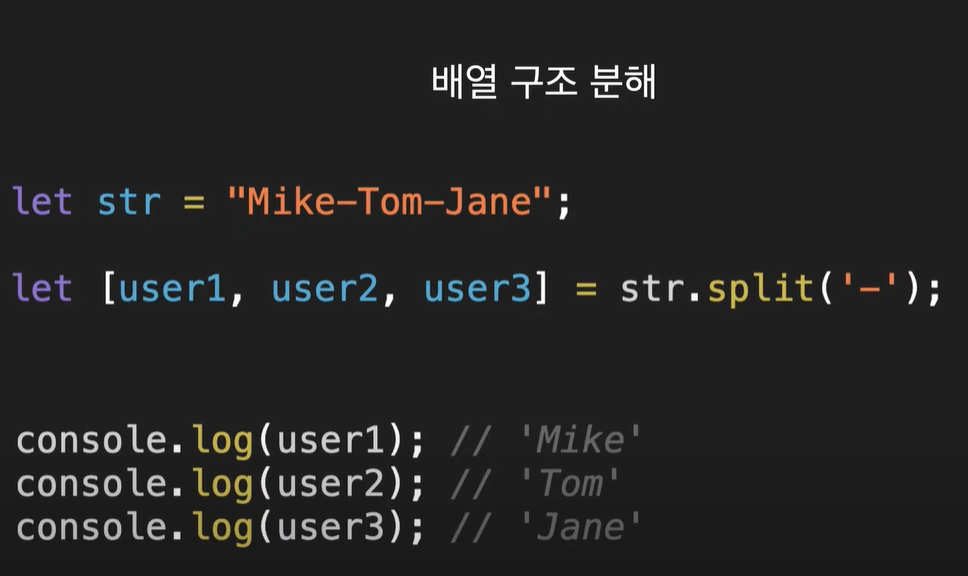
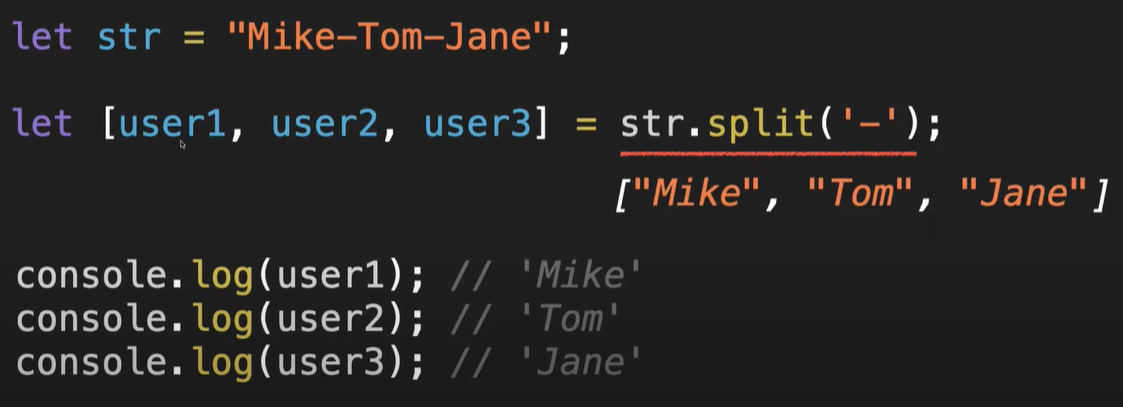
1-2. 배열 구조 분해: 기본값

- 한 변수가 기본 값이 없을 경우(짝이 안 맞는 경우)
- 기본값 없는 변수에 할당한 값만 할당되고, 나머지(a,b)는 새로 변경되지 않고 기존에 할당된 1,2가 할당된다.
let [a=3, b=4, c=5] = [1,2]
console.log(a); // 1
console.log(b); // 2
console.log(c); // 5
1-3. 배열 구조 분해: 일부 반환값 무시

1-4. 배열 구조 분해: 바꿔치기

let a = 1
let b = 2
let [c,d] = [b,a]
console.log(c,d)  // >>> 2 1
console.log(a,b)  // >>> 1 2

let [a, b] = [b, a] //>>> 초기화 오류 기존 변수와 다른 변수명을 사용해야 함.
2. 객체 구조 분해

2-1. 객체 구조 분해 : 새로운 변수 이름으로 할당
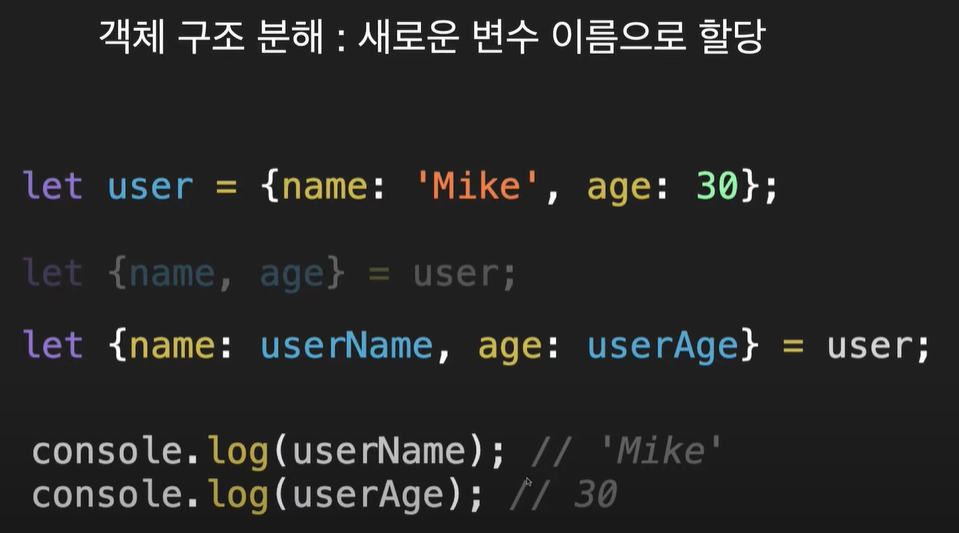
주의할 점은 원본 객체의 키이름이 바뀌는 것은 아니다.
비구조할당으로 저렇게 뜯어서 사용하기 위한 목적으로 새로운 변수를 만드는 것일 뿐!
let user = {이름:"Mike", 나이:30};
let {이름:userName, 나이:userAge} = user;
console.log(user) // { '이름': 'Mike', '나이': 30 }
console.log(userName) // Mike
console.log(userAge) // 302-2. 객체 구조 분해 : 기본값

- 마찬가지로 undefined 상태면 새로 할당한 값이 할당 성공.
- property에 기존에 할당된 값이 있었다면 새로운 할당은 실패
- 마찬가지로 원본 객체의 값이 바뀌진 않는다.
let user = {이름:"Mike", 나이:30};
let {이름, 나이=40, gender="male"} = user;
console.log(user);  // { '이름': 'Mike', '나이': 30 }
console.log(나이); // 30
console.log(gender); // male
3. 나머지 매개변수(Rest parameters)
인수 전달

function showName(name){
    console.log(name)
}
showName('Mike'); // Mike
showName('Mike','Tom');  // Mike
showName(); // undefined3-1. arguments

- arguments는 사실 Array 형태의 객체이다. array 처럼 length / index 사용이 가능하다.
- 그러나 forEach, map 과 같은 array 메서드는 사용 불가능하다.
- 참고로 객체는 length, index 못 쓴다.
3-2. 나머지 매개변수 (Rest parameters)
- 정해지지 않은 개수의 인수를 배열로 나타낼 수 있게 함.
- 매개변수 자리에 인수 아무것도 넣지 않아도 undefined가 아닌 빈 배열 [] 을 출력해줌.

Rest parameters 활용한 예제들
function add(...numbers) {
    let result = 0
    numbers.forEach((num) =>
        result += num
    )
    console.log(result);
}
add(1, 2, 3);  // 6
add(1, 2, 3, 4, 5, 6, 7, 8, 9, 10); // 55function add(...numbers) {
let result = numbers.reduce((prev, cur) => prev + cur, 0)
console.log(result);
}
add(1, 2, 3);
add(1, 2, 3, 4, 5, 6, 7, 8, 9, 10);Rest parameters 활용한 좀 더 실용적인 예제
class User {
    constructor(name, age, ...skills) {
        this.name = name;
        this.age = age;
        this.skills = skills;
    }
}

const user1 = new User("Mike", 30, "html", "css");
const user2 = new User("Tom", 20, "JS", "React");
const user3 = new User("Jane", 10, "English");

console.log(user1);
console.log(user2);
console.log(user3);

skills 배열로 여러 개 담김.
// >>>
User { name: 'Mike', age: 30, skills: [ 'html', 'css' ] }
User { name: 'Tom', age: 20, skills: [ 'JS', 'React' ] }
User { name: 'Jane', age: 10, skills: [ 'English' ] }※ 주의해야 할 점은 나머지 매개변수(Rest parameters)는 매개변수 자리에서 무조건 마지막에 위치해야 한다는 것.
4. 전개 구문(Spread syntax) : 배열, 객체, 복제
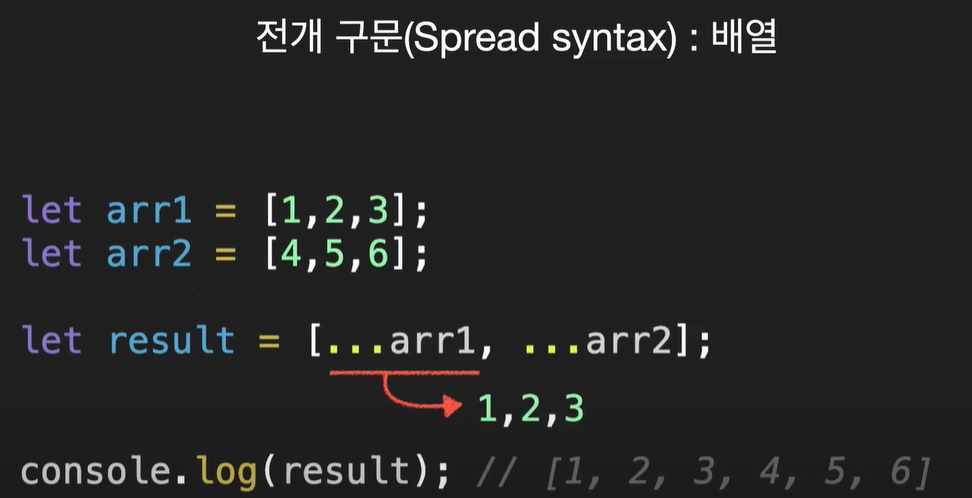
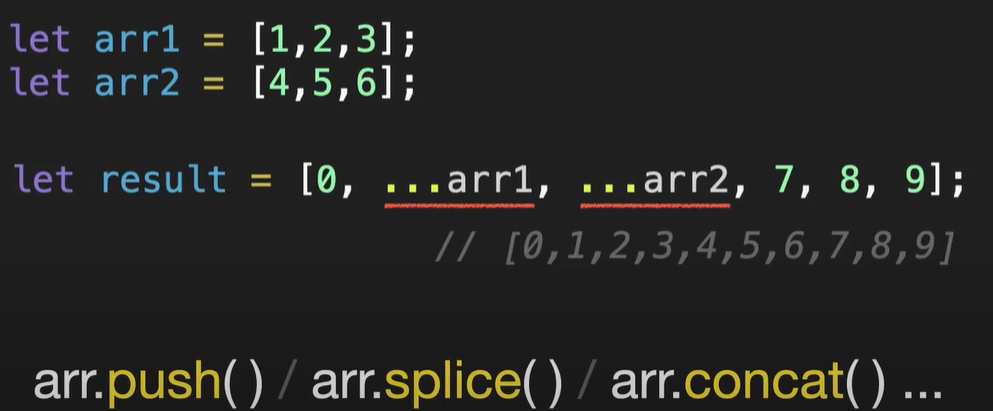

// 당연한거 가지고 오래 생각했음 이거...그냥 객체에 키랑 벨류 넣는건데...
// ★★★ 키에 대괄호 [] 있을 때 없을 때 차이 확인하셈.★★★
let user = {이름:"Mike", 나이:30};
let gender = '성별';
let value1 = 'male'
let newUser = {...user, [gender]:value1}
console.log(newUser);  // { '이름': 'Mike', '나이': 30, '성별': 'male' }
console.log(user); // { '이름': 'Mike', '나이': 30 }
let newUser2 = {...user, gender:value1}
console.log(newUser2); // { '이름': 'Mike', '나이': 30, gender: 'male' }

- 말 그대로 복제
- 복제한 객체의 property 값을 바꿔도 기존 피복제 배열의 값은 바뀌지 않는다. (assign 사용 안해도 된다!!)
활용 예시( forEach + unshift 사용했을 때 눈여겨 보아야 할 점)
문제1. arr2를 그대로 arr1앞에 붙여라

떼어낸 순서대로 앞에 붙였기 떄문!
let arr1 = [1,2,3];
let arr2 = [4, 5, 6];
arr2.reverse().forEach((num)=> arr1.unshift(num));
console.log(arr1); // >>> [ 4, 5, 6, 1, 2, 3 ]이렇게 하면 4, 5, 6 그대로 앞에 붙일 수 있다.
하지만! 이렇게 하면 복잡하다는거~
스프레드 구문을 이용하면 편하고 간단하다~
let arr1 = [1,2,3];
let arr2 = [4, 5, 6];
arr1 = [...arr2, ...arr1]
console.log(arr1); // >>> [ 4, 5, 6, 1, 2, 3 ]여기서부터는 너무 귀찮아서 사진으로 대체하겠음...
문제 2. 객체 합치기
1. assign 사용한 복잡한 방법

2. 전개(spread) 구문
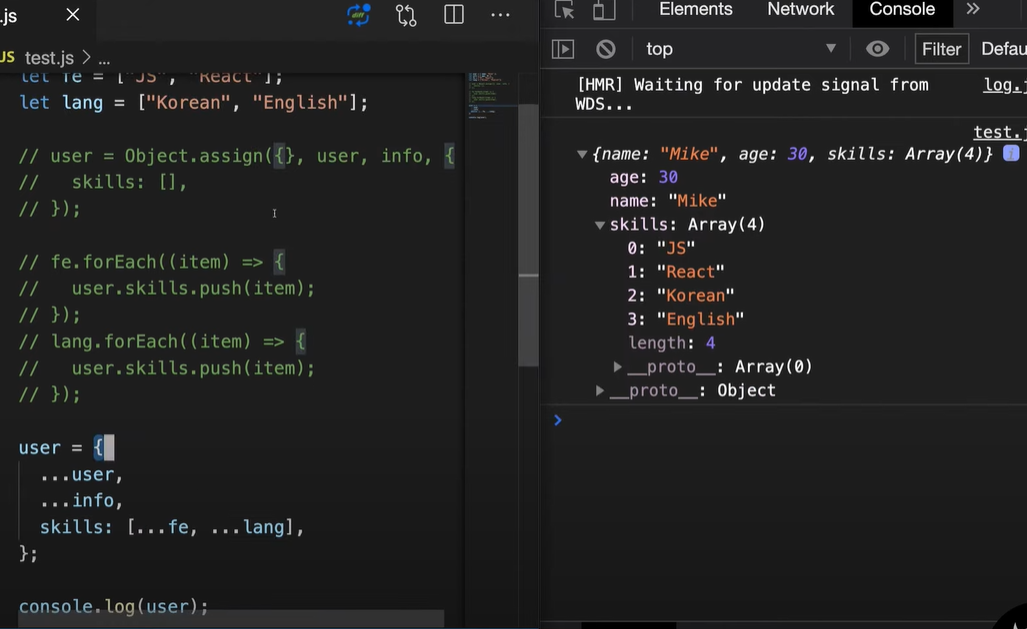
간단쓰
5. 클로저 (Closure)
5-1. 어휘적 환경(Lexical Environment)
*Lexical: 어휘의

호이스팅을 먼저 말씀하심.
- 스크립트 내에서 선언한 변수들, 즉, let 으로 선언한 one 이든, 함수로 선언한 addOne 이든 상관없이 일단 Lexical Environment 에 올라간다. (그림 상 노란색(?) 부분)
- 그러나 let 으로 선언한 one 의 경우에는 초기화가 안되기 때문에 재할당이 불가능하여 사용이 불가능하고, 그에 비해 함수 선언문은 변수와 달리 바로 초기화됨. 그래서 함수선언문 형태 함수는 Lexical Environment 에서도 사용이 가능함.
- 참고로 변수에 할당하는 방식인 함수 표현식은 호이스팅이 안된다.
- 함수 선언문과 함수 표현식은 다음과 같다.
function1();  >>> 나는 함수 선언문
function2();  >>> ReferenceError: Cannot access 'function2' before initialization


// 함수 선언문
function function1(){
    console.log("나는 함수 선언문")
}
// 함수 표현식
const function2 = () => {
    console.log("나는 함수 표현식")
}계속 이어서 ~

- 호이스팅 이후 밑으로 내려와서 ~
- let one에서 아직 할당이 되지 않았기 때문에 값이 초기값 undefined이지만 이제 에러는 뜨지 않는다.


- 함수선언은 초기에 이미 완료가 되었었고, 마지막 라인에 가서 함수가 실행된다.
- 그 순간 새로운 Lexical 환경이 만들어진다.
- 이 곳(Lexical 환경)에는 함수가 넘겨받은 매개변수와 지역변수들이 저장된다.
- 함수는 호출되는 동안 함수에서 만들어진 내부 Lexical환경과 외부Lexical 환경 두 개를 가짐.

- 내부 Lexical 환경은 외부 Lexical 환경에 대한 참조를 갖는다.
- 지금은 저 함수의 외부 Lexical 환경이 전역 Lexical 환경이 되는 것이다.
- 코드에서 변수를 찾을 때 내부에서 찾고, 없으면 외부, 거기에도 없으면 전역 Lexical 환경까지 넓혀서 찾는다.(개인적으로 그냥 '내부, 외부 순으로 찾는다'라고 표현할 수 있다고 생각함.)
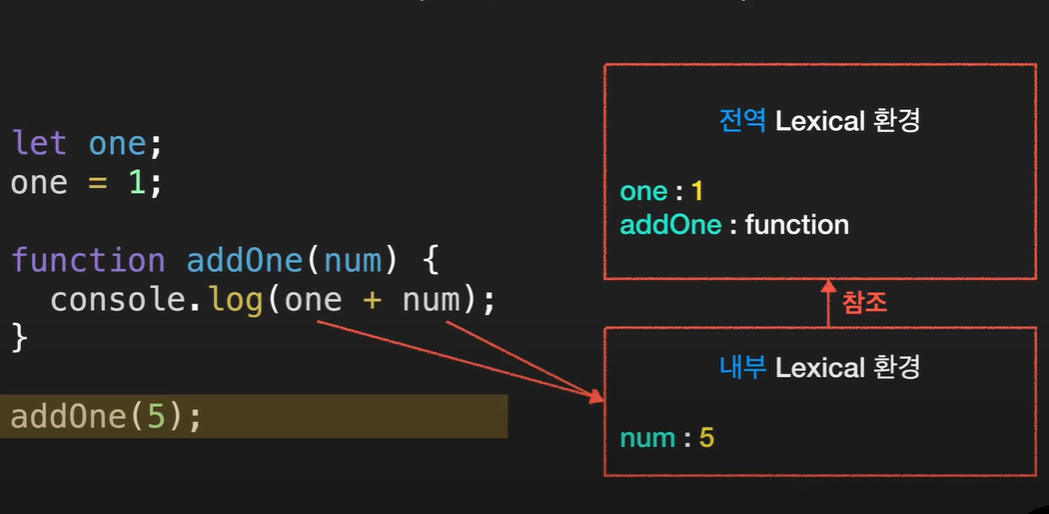
- 이 코드에서 one과 num은 내부 Lexical 환경에서 우선 찾는다.
- num은 찾았지만, one이 없는 상태

- 외부 Lexical로 넓혀서 있는지 찾게 됨.
- 이젠 찾았으니 더해줄 수 있게 됨.
- 끝
하나 더 예시로

1. 최초 실행 시 makeAdder 함수와 변수 add3은 전역 Lexical 환경에 들어간다.
2. add3은 초기화가 안 된 상태고 그렇기 때문에 사용할 수 없음.
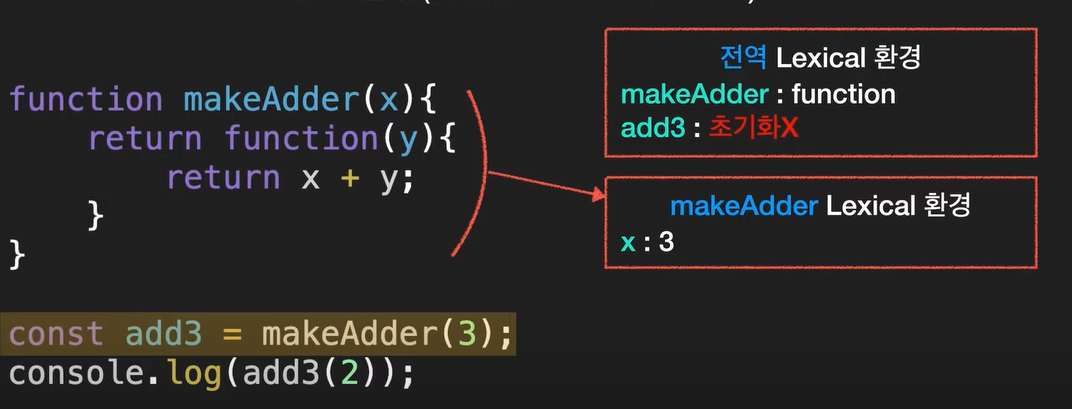
1. 이 노랑색 라인이 실행될 때 makeAdder 가 실행된다.
2. 그러면서 Lexical 환경이 만들어진다.
3. 전달받은 x의 값이 들어감. 함수의 Lexical 환경에는 넘겨받은 매개변수와 지역변수들이 저장됨.
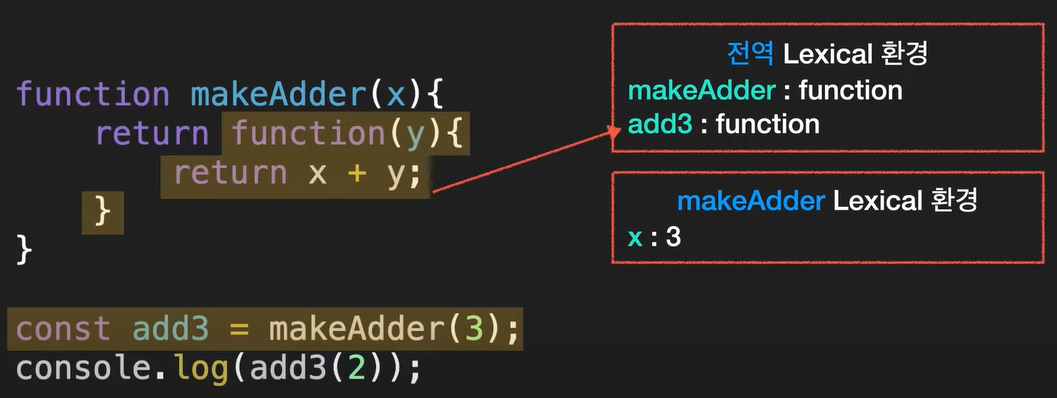
1. 전역 Lexical 환경에 있던 add3은 함수가 실행됐으니 노랑색 부분의 리턴하는 함수가 된다. (선언만 되어있던 add3이 함수로 변신)

1. 이제 마지막 줄을 실행한다
2. add3을 실행하면 저 빨강색 곡선줄 함수가 실행되는데 이 때 또 Lexical 환경이 만들어진다.
3. 이번에는 y가 2로 들어감.

1. 가장 내부 Lexical 환경(익명함수)에서부터 시작해서 처음에는 y와 x 순서대로 찾는다.
2. y는 있는데 x는 없으니 그 다음 참조하는 외부 Lexical 환경으로 가서 x를 찾았음.
3. 그다음 x+y 는 3이라는 결과값 return
5-2. 결론적으로 Closure란?
Closure 총정리
1. 함수와 렉시컬 환경의 조합.
2. 함수가 생성될 당시의 외부 변수를 기억하고 생성 이후에도 계속 접근 가능한 현상을 의미한다.
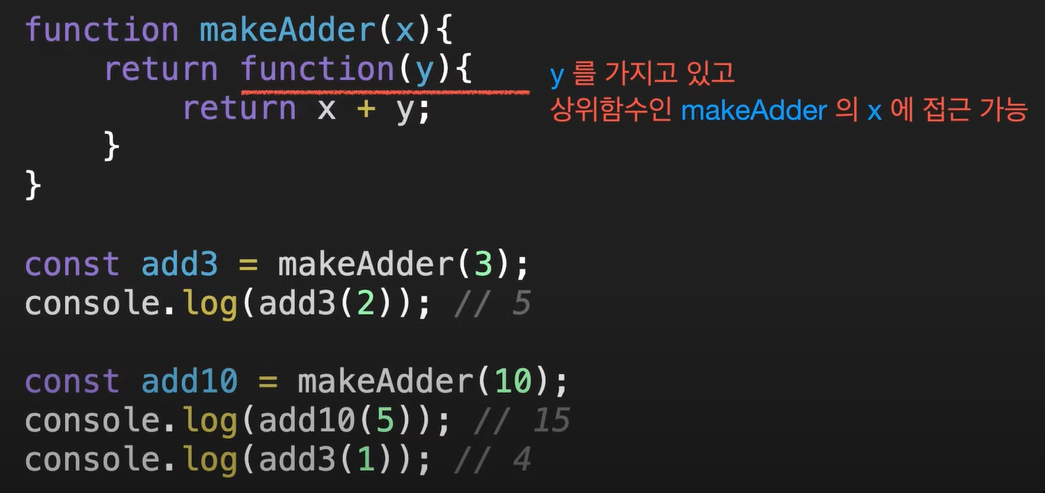


- 여기 보면 makeAdder(10) 이 호출되지만 add3에는 아무 변화가 없음.
- add10과 add3은 서로 다른 환경을 가지고 있기 때문
function makeCounter () {
    let num = 0; // 은닉화!
    return function () {
        return num++;
    };
}

let counter = makeCounter();
console.log(counter()); // 0
console.log(counter()); // 1
console.log(counter()); // 2
6. setTimeout / setInterval : 스케줄링 함수 & clearTimeout / clearInterval
6-1. setTimeout

- 이런 형태로도 인수를 전달할 수 있구나!!setTimeout 은 Timeid를 반환한다.
- clearTimeout() 은 예정된 작업을 없앤다.
- setTimeout 은 Time Id를 반환하는데 이것을 이용하면 스케쥴링을 취소할 수 있음.
function showName (name){
    console.log(name);
}

const tid = setTimeout(showName, 3000, 'Mike')
clearTimeout(tid);
>>> 아무것도 반환하지 않음
6-2. setInterval()

- 한 번만 찍는 것이 아니라 3초마다 계속 찍음.
- clearInterval 로 막을 수 있음.
let i = 0
function showName (name){
    console.log(i++, name);
}

const tId = setInterval(showName, 3000, 'Mike')
clearInterval(tId);
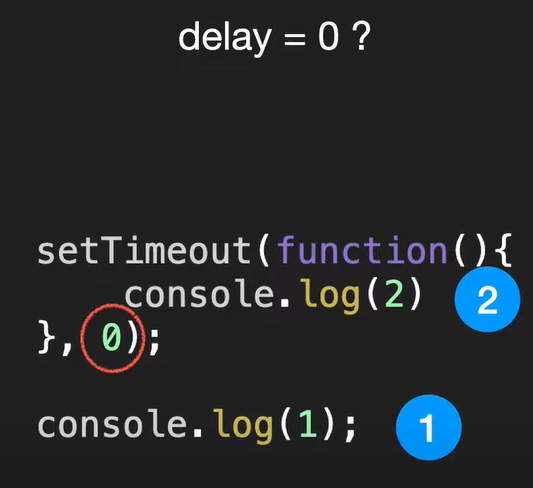
- delay를 0으로 설정해도 나중에 실행된다.
- 이유는 현재 실행중인 스크립트가 종료된 이후 스케줄링 함수가 실행되기 때문
- 그리고 브라우저는 기본적으로 4ms 정도의 대기시간이 있음.
- 0으로 적어도 4ms 혹은 그 이상으로 걸릴 수 있다는 얘기.
7. call, apply, bind
call, apply, bind: 함수 호출 방식과 관계없이 this를 지정할 수 있음.
7.1 Call

- call(매개변수)
- Call 메서드는 모든 함수에서 사용할 수 있으며, this를 특정값으로 지정할 수 있습니다.
const mike = {
    name: 'Mike',
}

const tom = {
    name: "Tom",
}

function showThisName(){
    console.log(this.name);
}

showThisName(); // >>> undefined
showThisName.call(mike);  // >>> Mike
const mike = {
    name: 'Mike',
}

const tom = {
    name: "Tom",
}

function showThisName(){
    console.log(this.name);
}


function update(birthday, occupatioin){
    this.birthday = birthday;
    this.occupatioin = occupatioin;
}

update.call(mike, 1999, "singer");
console.log(mike)
update.call(tom, 2002, "teacher");
console.log(tom);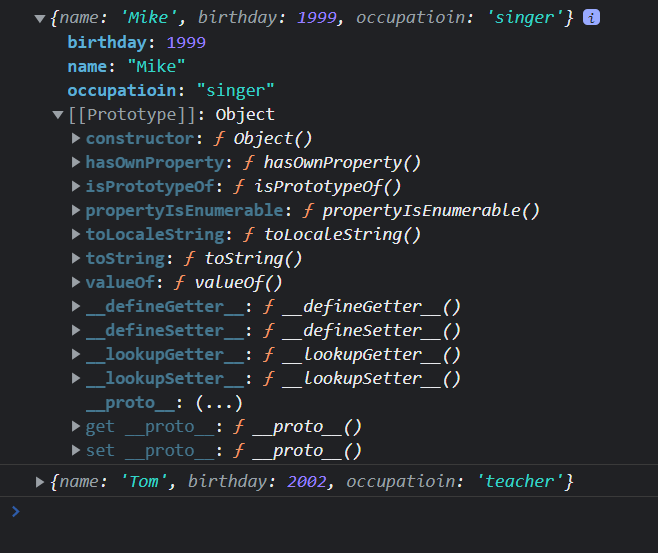
7.2 apply

- apply는 함수 매개변수를 처리하는 방법을 제외하면 call과 완전히 같음.
- call은 일반적인 함수와 마찬가지로 매개변수를 직접 받지만, apply는 매개변수를 배열로 받습니다.
// function update(birthday, occupatioin){
//     console.log(args)
//     this.birthday = birthday;
//     this.occupatioin = occupatioin;
// }

function update(...args){
    console.log(args)
    this.birthday = args[0];
    this.occupatioin = args[1];
}

update.apply(mike, [1999, "singer"]);
console.log(mike)
call 사용 예시(spread 연산자 사용)
const nums =  [3,10,1,6,4]
// const minNum = Math.min(...nums);
// const maxNum = Math.max(...nums);

// console.log(Math.max(...nums))  사실 굳이 밑에처럼 안해도 됨.
const minNum = Math.min.call(null, ...nums)
const maxNum = Math.max.call(null, ...nums)

console.log(minNum);
console.log(maxNum);
apply 사용 예시(apply는 배열을 뜯어서 작동하기 때문에 spread 연산자 필요없음)
const nums =  [3,10,1,6,4]
// const minNum = Math.min(...nums);
// const maxNum = Math.max(...nums);

// console.log(Math.max(...nums))  사실 굳이 밑에처럼 안해도 됨.
const minNum = Math.min.apply(null, nums)
const maxNum = Math.max.apply(null, nums)

console.log(minNum);
console.log(maxNum);
7.3 bind

- 함수의 this 값을 영구히 바꿀 수 있습니다.
function update(birthday, occupatioin){
    this.birthday = birthday;
    this.occupatioin = occupatioin;
}

const updateMike = update.bind(mike);
updateMike(1980, 'police');
console.log(mike);
bind 전
const user = {
    name: "Mike",
    showName: function(){
        console.log(this)
        console.log(`hello, ${this.name}`)
    },
}

user.showName();

let fn = user.showName;
fn()
bind 후
const user = {
    name: "Mike",
    showName: function(){
        console.log(this)
        console.log(`hello, ${this.name}`)
    },
}


let fn = user.showName;
fn.apply(user);
fn.call(user);
let boundFn = fn.bind(user);
boundFn();apply 랑 call 메서드는 바인드함과 동시에 함수를 실행시키는데, bind 메서드는 말 그대로 바인딩만 해주기 때문에 바인딩 한 변수를 따로 호출을 한 번 더 해줘야 함.

8. 상속, prototype
8.1. 상속과 prototype의 개념
- 부모의 property를 부여받는 행위를 상속이라고 한다. 그리고 이 상속은 prototype이라는 일종의 유전자를 통해 이루어진다.
- property는 어떠한 객체의 key와 value라고 생각하면 된다.
- 함수또한 property에 포함된다. 객체에 속한 함수를 메서드라고 한다.
- 객체에는 property를 확인하는 방법이 있다.
- .hasOwnproperty('프로퍼티이름')

hasOwnproperty는 갑자기 어디서 생긴 것일까?

- user 안에 hasOwnproperty라는 프로퍼티를 만든 적이 없는데 어디서 생긴 것일까?
- 객체는 프로퍼티를 읽으려고 하는데 없으면 프로토타입에서 찾는다.
- __proto__ 는 프로토타입을 의미한다.

- 만약 객체 안에 hasOwnproperty 라는 프로퍼티를 수동으로 지정해주면 수동으로 지정한 hasOwnproperty를 실행한다.
const car = {
    wheels: 4,
    drive() {
        console.log("drive ...");
    }
}

const bmw = {
    color: 'red',
    navigation: 1,
}

const benz = {
    color: 'black',

}

const audi = {
    color: 'blue'
}

bmw.__proto__ = car;  // car의 상속을 받음.
benz.__proto__ = car;
audi.__proto__ = car;- 마찬가지로 객체에 없는 기능을 프로토타입을 이용해서 부모로부터 상속받을 수 있음.


- 상속은 계속 이어질 수 있음.(또 다른 객체가 bmw를 상속받으면 여태까지 상속받은 기능들 모두 이용 가능)
- 이런 것을 Prototype Chain 이라고 한다.
const car = {
    wheels: 4,
    drive() {
        console.log("drive ...");
    }
}

const bmw = {
    color: 'red',
    navigation: 1,
}

const benz = {
    color: 'black',

}

const audi = {
    color: 'blue'
}

const x5 = {
    color: 'white',
    name: 'x5'
}

bmw.__proto__ = car;  // car의 상속을 받음.
benz.__proto__ = car;
audi.__proto__ = car;
x5.__proto__ = bmw;
- for문과 Object.keys .values 돌린 결과값은 다음과 같다.
- for 문으로 구분하고 싶으면 다음과 같은 코드를 주면 된다.

8.2 생성자 함수 이용
.prototype.프로퍼티명
const Bmw = function (color) {
    this.color = color;
}
Bmw.prototype.wheels = 4;
Bmw.prototype.drive = function(){
    console.log("drive ...");
};


const x5 = new Bmw("red");
const z4 = new Bmw("blue");
특정 생성자 함수의 인스턴스인지 확인(내새꾸인지 확인)
instanceof

내 생성자 함수인지(우리엄마인지 확인)
instance명.constructor === 생성자 함수명
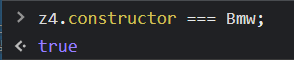
프로토타입 한꺼번에 객체로 지정하지 않는 이유: constructor 작동 고장남.


- 고장나는 거 싫으면 수동으로 명시해줘도 된다.


const Bmw = function (color) {
    const c = color;
    this.getColor = function(){
        console.log(c);
    }
}

const x5 = new Bmw("red");- 만약 프로퍼티 값 같은거 못바꾸게 하고 싶으면 이런 식으로 하면 된다.
9. Class
:ES6에 추가된 스펙
constructor
생성자를 초기화하는 기능
class User1 {
    constructor(name, age) {
        this.name = name;
        this.age = age;
    }

    showName(){
        console.log(this.name)
    }
}

const tom = new User1("Tom", 27);
tom.showName();  // >>> Tom
기존 생성자 함수랑 차이점
// 생성자 함수
const User1 = function(name, age){
    this.name = name;
    this.age = age;
    this.showName = function(){
        console.log(this.name);
    };
}
const mike = new User1("mike", 30);

// 클래스
class User2 {
    constructor(name, age) {
        this.name = name;
        this.age = age;
    }

    showName(){
        console.log(this.name)
    }
}
const tom = new User2("Tom", 27);

- 생성자 함수로 만든 mike는 객체 내부에 showName 메서드가 있고,
- class로 만든 tom은 프로토타입에 showName 메서드가 있다.

- 생성자 함수로 만든 mike도 tom과 동일한 모습으로 해주고 싶다면 prototype 메서드를 이용하여 수동으로 추가해주면 된다.


Class 함수는 좀 더 엄격한 인스턴스 생성에 적합하다. 기존 생성자 함수는 인스턴스를 생성할 때 new가 빠지면 그냥 undefined를 반환해서 잘못된 상태인지 인지하기 힘들지만, Class는 new가 빠지면 다음과 같은 에러를 반환한다. 결론은 생성자 함수 대신 Class 함수를 쓰면 된다. 또한 constructor가 클래스라고 명시해주기 때문에 클래스인지 인지하기가 더욱 쉽다.
9-1. class의 상속 방법 extends
class Car {
    constructor(color){
        this.color = color;
        this.wheels = 4;
    }

    drive() {
        console.log("drive..");
    }

    stop() {
        console.log("부모클래스 STOP!");
    }
}

class Bmw extends Car {
    brand;
    constructor(color,brand){
        super(color);
        this.brand = brand;
    }

    park() {
        console.log("PARK");
    }

    stop() {
        super.stop();
        console.log("자식클래스 STOP!")
    }
}

const z4 = new Bmw("blue", "Hyundai");
- 클래스에서 선언한 메서드는 prototype 밑으로 들어간다!!
- 어느 클래스에서 선언된 메서드인지는 구별되어서 나온다.
- 일반적인 변수와 값은 어디 class에서 상속받은 것인지 구별하지 않고 제일 마지막에 호출된 클래스의 key와 value 형태로 추출된다
- 자식 클래스에서 동일한 메서드명을 만들고 부모와 동일한 기능을 부여하고 싶으면 super 연산자를 쓴다.
9.2 메서드 오버라이딩(overriding)
- BMW클래스에서 stop메서드의 내부에 super 연산자를 쓰지 않는다면 어떻게 될까? 밑의 메서드 오버라이딩을 살펴보자.
class Bmw extends Car {
    brand;
    constructor(color,brand){
        super(color);
        this.brand = brand;
    }

    park() {
        console.log("PARK");
    }

    stop() {
        // super.stop();
        console.log("자식클래스 STOP!")
    }
}

- BMW(자식클래스)의 stop() 메서드가 이름이 동일한 Car(부모클래스)의 stop()메서드 코드를 그대로 덮어버리게 된다.
- 자식클래스의 메서드만 구현되는 모습을 볼 수 있다. 이런 현상을 메서드 오버라이딩이라고 한다.
10. 프로미스(promise)

- Promise 는 resolve와 reject를 콜백함수로 받는다.
- Promise는 state와 result를 프로퍼티로 갖는다.

- State는 초기에 pending 이었다가 resolve(value)가 호출되면, 즉 성공하면, fulfilled(이행됨) 상태가 됨. 이 때 result는 resolve 함수로 전달받은 값임.
- 만약 reject가 호출되면, 즉 실패하면, state는 rejected(거부됨) 상태가 된다. 이 때 result 에는 reject 함수로 전달받은 error가 담긴다.
10-3. 사용예시


10-4. then과 catch 메서드 (finally)

(내가 임의적으로 소비자 입장이라고 생각하고 이해하자)
- 프로미스의 then 메서드를 이용해서 resolve와 reject를 처리할 수 있음.
- then 이외에 사용할 수 있는 것이 catch와 finally 임.
- catch는 에러가 발생한 경우, 즉, reject인 경우에만 실행됨.
- 위 사진은 동일한 코드같지만, catch 문으로 넘겨주면 가독성이 더 좋을뿐더러 혹시 모를 첫 번째 function(result){} 문에서 에러가 발생 시 catch문으로 넘겨 에러를 잡아줄 수 있음.

- finally 는 이행이든 거부든 상관없이 무조건 마지막에 실행됨.
- 로딩 화면 같은 것을 없앨 때 유용하다고 함.
const pr = new Promise((resolve, reject) =>{
    setTimeout(()=>{
        // resolve("OK")
        reject(new Error("err...."))
    }, 1000);
})

console.log("시작");
pr.then((result)=>{
    console.log(result);
}).catch((err)=>{
    console.log(err);
}).finally(()=>{
    console.log("끝");
})


/*
시작
Error: err....
    at Timeout._onTimeout (e:\자바스크립트\잡스테스트\자바중급풀정리\Test.js:4:16)
    at listOnTimeout (node:internal/timers:564:17)
    at process.processTimers (node:internal/timers:507:7)
끝
*/
10-5. 콜백지옥
코드는 잘 출력되나 depth가 너무 깊어지는... 콜백이 무더기로 쌓여서 코드 가독성이 떨어져 버리는 것을 의미한다.
const f1 = (callback) => {
    setTimeout(()=>{
        console.log("1번 주문 완료");
        callback();
    }, 1000);
};

const f2 = (callback) => {
    setTimeout(() => {
        console.log("2번 주문 완료");
        callback();
    }, 3000);
};

const f3 = (callback) => {
    setTimeout(() => {
        console.log("3번 주문 완료");
        callback();
    }, 2000);
};

console.log("시작");
f1(()=>{
    f2(()=>{
        f3(()=>{
            console.log("끝")
        })
    })
})
10-6. 프로미스로 콜백 해결
let msg = ""

const f1 = () => {
    return new Promise((res) => {
        setTimeout(() => {
            msg = "1번 주문 완료"
            res(msg);  // res로 들어오는 값이 있어야 then으로 넘어가겠군!
        }, 1000);
    })
};

const f2 = (message) => {
    console.log(message)
    return new Promise((res, rej) => {
        setTimeout(() => {
            // msg = "2번 주문 완료"
            rej(new Error("XX"));
        }, 3000);
    })
};

const f3 = (message) => {
    console.log(message)
    return new Promise((res) => {
        setTimeout(() => {
            msg = "3번 주문 완료"
            res(msg);
        }, 2000);
    })
};


console.log("시작");
// 이거 밑에 코드 좀 기억해둘 필요가 있긴 함.
f1()
    .then(res => f2(res))
    .then(res => f3(res))   // 여기서 주의해야 할 점은 여기서 그냥 끝나는게 아니라
    .then(res => console.log(res)) // 여기서 f3 처리한 후 res에 담긴 msg 콘솔로 찍어줘야 함.
    .catch(err => console.log(err))
    .finally(() => {
        console.log("끝");
    })


>>>
시작
1번 주문 완료
Error: XX
    at Timeout._onTimeout (e:\자바스크립트\잡스테스트\자바중급풀정리\Test.js:17:17)
    at listOnTimeout (node:internal/timers:564:17)
    at process.processTimers (node:internal/timers:507:7)
끝- 코드 가장 밑 부분처럼 프로미스가 연결연결되는 것을 프로미스 체이닝(Promises Chaining) 이라고 한다.
- 참고로 f2()가 reject를 반환한다면 f1()까지만 실행하고 res => f2(res) 돌린 후에 rej 가 되기 때문에 에러를 실행한다.
- 이 때 f3은 res를 받아보지도 못한다.
- 이후 finally 구문 끝 출력.
10-7. 프로미스 올 ( Promise.all([ ]) ): 프로미스 시간절약 feat. ( console.time & console.timeEnd )
- 장점과 단점이 있다.
프로미스 올의 장점
- 장점은 프로미스 올 사용 시 시간 절약을 할 수 있다!
//Promise.all
console.time('x');  // 시간을 잴 수 있음. 시간재기 시작부분.
Promise.all([f1(), f2(), f3()]).then((res)=>{
    console.log(res);
    console.timeEnd('x');  // 시간재기 끝부분
})


>>> [ '1번 주문 완료', '2번 주문 완료', '3번 주문 완료' ]
x: 3.011s- 하나하나씩 다 기다리는게 아니라 전체 동시에 실행시켜서 가장 오래 기다려야 하는 프로미스가 끝났을 때 한꺼번에 배열 형태로 값이 나온다. (한꺼번에 실행 모두 이행되면 값을 사용할 수 있음) => 시간절약 가능!!!
- console.time(arg) & console.timeEnd(arg) 를 사용하면 시간을 잴 수 있음. 인수자리에 특정 값(문자나 숫자 기타 등) 넣으면 된다. 각각 시간재기 시작부분, 시간재기 끝부분이다.
프로미스 올의 단점
- 하나라도 reject를 반환한다면 전부 에러를 띄운다.

- 다 보여주거나 아예 안보여주거나 할 때 쓴다.
10-8. 프로미스 레이스 (Promise.race)
console.time('x');  // 시간을 잴 수 있음. 시간재기 시작부분.
Promise.race([f1(), f2(), f3()]).then((res)=>{
    console.log(res);
    console.timeEnd('x');  // 시간재기 끝부분
})

>>> 참고로 undefined는 배열 내부에서 이미 한 번씩 함수 실행하는데 메시지가 res 로 안들어와져서 undefined 임. 여기서는 무시해도 됨.
undefined
undefined
1번 주문 완료
x: 1.007s- 가장 먼저 실행된 프로미스 값만 보여줌. ( 만약 f2의 reject 가 시간이 가장 짧았다면 undefined 두 개 후에 에러가 가장 먼저 나옴.)
11. async, await
11-1. async
async function getName(){
    return "Mike";
}

console.log(getName())async는 항상 프로미스를 반환

async function getName(){
    return Promise.resolve("Mike");  //Promise.resolve()는 constructor 가 아니라서 new 못 붙임.
}

getName().then(res => console.log(res));return 이 바로 프로미스.resolve면 바로 뽑을 수 있음.
async function getName(){
    // return Promise.resolve("Mike");  //Promise.resolve()는 constructor 가 아니라서 new 못 붙임.
    throw new Error("err...")
}

getName()
        .then(res => console.log(res))
.catch(err=>console.log(err))reject도 마찬가지~~

11-2. await
- await 키워드는 async 내부에서만 사용할 수 있음. 일반함수 내에서 사용하면 에러가 발생함.
- await 도 오른쪽에는 Promise 가 옮.
- 그 프로미스가 처리될 때까지 기다림.
function getName(name) {
    return new Promise((resolve, reject) => {
        setTimeout(() => resolve(name), 1000)
    })
};

async function showName() {
    const result = await getName("Mike");
    console.log(result);
};

console.log("시작")
showName();
function getName(name) {
    return new Promise((resolve, reject) => {
        setTimeout(() => resolve(name), 4000)
    })
};

async function showName() {
    const result = await getName("Mike");
    console.log("나는 위에 await 땜시 4초 기다렸다가 Mike랑 한꺼번에 나와...")
    console.log(result);
};

console.log("시작")
showName();
기존 코드를 async / await 코드로 바꿔보았다. 가독성 향상!
let state = ""

const f1 = () => {
    return new Promise((res) => {
        setTimeout(() => {
            state = "1번 주문 완료"
            res(state);  // res로 들어오는 값이 있어야 then으로 넘어가겠군!
        }, 1000);
    })
};

const f2 = (msg) => {
    console.log(msg);
    return new Promise((res) => {
        setTimeout(() => {
            state = "2번 주문 완료"
            res(state);
        }, 3000);
    })
};

const f3 = (msg) => {
    console.log(msg);
    return new Promise((res) => {
        setTimeout(() => {
            state = "3번 주문 완료"
            res(state);
        }, 2000);
    })
};


console.log("시작");
async function order() {
    const result1 = await f1();
    const result2 = await f2(result1);
    const result3 = await f3(result2);
    console.log(result3);
    console.log("종료");
};
order();


// console.log("시작");
// 이거 밑에 코드 좀 기억해둘 필요가 있긴 함.
// f1()
//     .then(res => f2(res))
//     .then(res => f3(res))   // 여기서 주의해야 할 점은 여기서 그냥 끝나는게 아니라
//     .then(res => console.log(res)) // 여기서 f3 처리한 후 res에 담긴 state 콘솔로 찍어줘야 함.
//     .catch(err => console.log(err))
//     .finally(() => {
//         console.log("끝");
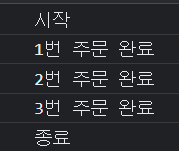
//     })
async/await 와 try/catch 구문 + finally
reject 를 두 번째에 넣어 오류를 내보도록 수정했다.
async/await 구문은 try/catch 를 사용하여 오류를 잡아줘서 무사히 코드를 계속 진행시킬 수 있게 해준다.
console.log("시작");
async function order() {
    try {
        const result1 = await f1();
        const result2 = await f2(result1);
        const result3 = await f3(result2);
        console.log(result3);
    } catch (error) {
        console.log(error);
    } finally {
        console.log("종료");
    }
};
order();
pomise.all / promise.race 동일하게 사용가능 하다~~
12. Generator
function* fn() {
    console.log(1);
    yield 1;
    console.log(2);
    yield 2;
    console.log(3);
    console.log(4);
    yield 3
    return "finish";
}

const a = fn();- 함수의 실행을 중간에 멈췄다가 재개할 수 있는 기능.
- function 옆에 별 * 을 붙임 >>> function*
- 그러면 Generator 함수가 됨.
12-1. Generator next() 메서드와 value&done
next 메서드와 value&done

- next 메서드를 사용하면, 가장 가까운 yield 문을 만날 때까지 코드를 읽어 실행하고 데이터 객체를 반환한다.
- value는 yield 오른쪽에 있는 값. 만약 값을 생략하거나 generator문이 끝났는데도 next를 사용한다면 value는 undefined 가 됨.
- done은 이름 그대로 함수 코드가 끝났는지 나타냄. 실행이 끝나면 true, 아니면 false를 가진다

- generator 문 마지막에 return "finish" 가 있어서 value가 "finish" 가 된 거. return 없으면 그냥 value는 undefined로 끝남.
- done은 next 메서드를 사용하여 제너레이터문이 끝남과 동시에 계속 true인 상태가 된다.
12-2. Generator return() 메서드
return 메서드

a.return('END')- return 메서드를 쓰면 제너레이터 문이 다 끝나지 않았어도 done을 true로 바꾸고(=제너레이터 문을 강제로 끝냄), value 에 값을 줄 수 있음.
- return 메서드 이후 next 메서드를 쓰면 이미 제너레이터 문이 끝났기 때문에 value는 undefined가 되어버림. return 메서드로 제너레이터 문이 끝난 상황이기 때문에 마찬가지로 done은 계속 true를 유지.
12-3. Generator throw() 메서드
throw 메서드

- 마찬가지로 done을 true로 바꿈.
- 이후의 상황도 return 메서드와 동일
12-4. Generator의 특징( feat. iterable한 객체 = 배열, 문자열, Generator )
iterable 하다. = 반복이 가능하다는 의미(==반복 가능한 객체라는 뜻). 몇 가지 다음과 같은 조건이 있다.
- Symbol.iterator 메서드가 있다.
- Symbol.iterator 메서드를 사용한다면 iterator 상태가 돼야 한다.
iterator : Symbol.iterator 메서드로 호출한 결과를 iterator 라고 함. 마찬가지로 다음과 같은 조건이 있다.
- next 메서드를 가진다.
- next 메서드는 value와 done 속성을 가진 객체를 반환한다.
- 작업이 끝나면 done은 true가 된다.

- 그러니까 Generator는 iterable 하면서 iterator 인 것임.
- 참고로 배열, 문자열도 마찬가지임.
- 배열, 문자열의 prototype을 살펴보면 Symbol.iterator 메서드가 있음. 사용해서 iterator로 만들면 Generator랑 동일하게 작동함. 쓸 일은 없는 거 같은데 Generator랑 같다는 걸 확인.
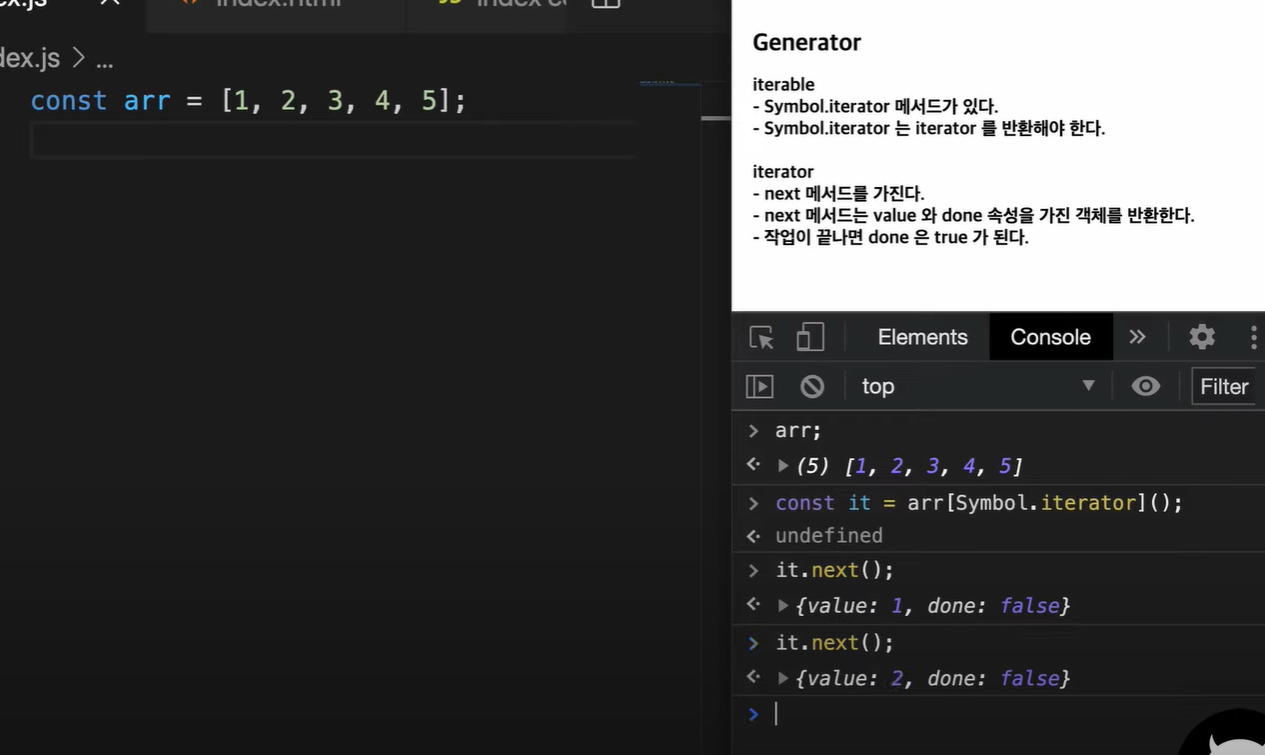
- iterable 한 객체들(즉, generator와 배열, 문자열)은 for of 문을 사용할 수 있음.
- for of 문 작동 방식은 다음과 같다.
- for of 가 실행되면 먼저 Symbol.iterator 를 호출하고 만약에 없으면 에러가 발생한다.(즉, 에러가 발생하는 경우는 iterable 하지 않은 객체가 for of를 사용한 경우다.)
- 반환된 메서드에 next 메서드를 호출하면서 done이 true 가 될 때까지 반복함.
function* fn() {
try {
console.log(1);
yield 1;
console.log(2);
yield 2;
console.log(3);
console.log(4);
yield 3
return "finish";
} catch (error) {
console.log(error);
}
}
const a = fn();
for(let args of a){
console.log(args)
}
>>>
1
1
2
2
3
4
3
12-5. next 메서드에 인수 전달 ( ex . next(인수) )
function* fn(){
    const num1 = yield "첫 번째 숫자를 입력해주세요.";
    console.log(num1);

    const num2 = yield "두 번째 숫자를 입력해주세요.";
    console.log(num2);

    return num1 + num2;
}

const a = fn();
- 첫 next 실행 후는 num1 을 가리키게 되고, 다음 번 next()메서드를 실행할 때 2라는 인수를 담아 그 상수 num1에 값을 할당한다.
- 결론적으로 console에 2가 찍히게 되고 다음 yield 문을 실행한다. 그 다음은 설명이 없어도 해석할 수 있을 것이다.
- 이렇듯이 Generator는 외부로부터 값을 입력 받을 수 있음.
- 값을 미리 만들어 두지 않음.
- 메모리 관리 측면에서 효율적임. 필요한 순간에만 연산해서 값을 줌. break가 없는 While true문에서도 안전하게 사용 가능하다.
12-6. yield* 사용 ( * 썼다잉! )
function* gen1() {
    yield "W";
    yield "o";
    yield "r";
    yield "l";
    yield "d";
}

function* gen2() {
    yield "Hello,";
    yield* gen1();
    yield "!";
}

console.log(...gen2());

// >>> Hello, W o r l d !- gen2 제너레이터에서 yield* 을 하고 다른 제너레이터 객체[함수]를 호출하고 있음.
- console.log 에서 구조분해할당을 사용하였는데, for of 와 마찬가지로 done이 true가 될 때까지 값을 펼쳐주는 역할을 한다.
- 여기서 yield*옆에 제너레이터 함수를 썼는데, 사실 yield* 옆에는 반복가능한 모든 객체가 올 수 있음.

코딩앙마라는 분은 Redux Saga에서 활발하게 쓴다고 하심~
13. ES2021에서 추가된 JS 신문법들 정리
13-1. replaceAll()
const str1 = "Hello world";
console.log(str1.replace('l', '~'));
console.log(str1.replace(/l/g, '~'));
console.log(str1.replaceAll("l", "~"));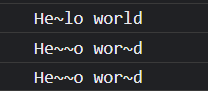
기존 replace 메서드의 문제점
replaceAll 이 훨씬 간편하다.
// 정규표현식에서 특수문자 앞에는 역슬래쉬 \ 를 붙여줘야 하는 불편함이 있음.
const str1 = "I'm [Mike]. This is Tom's [Car].";
console.log(str1.replaceAll("[", "~").replaceAll("]", "~"));
console.log(str1.replace(/\[/g, "~").replace(/\]/g, "~"));
13-2. Promise.any()
- Promise.race 는 res 든 rej 든 상관 안하고 가장 먼저 나오는 프로미스 값을 반환해줬는데,
- Promise.any 는 이행된 값, 즉, res로 뽑힌 값만 반환해준다.
- 그러나 Promise.any 를 사용했을 때 모두 reject 면 모든 프로미스가 거부당했다는 메시지를 반환한다.

const rejPromise = new Promise((res, rej) => {
    setTimeout(() => rej("fail..")
    , 1000)
})

const resPromise = new Promise((res, rej) => {
    setTimeout(() => res("success")
    , 2000)
})

// 참고로 여기서 rejPromise 뒤에 호출()을 붙여주지 않는 이유는 함수가 아니기 때문. 이미 실행된 값이 rejPromise에 할당되어 있는 것.
Promise.race([rejPromise, resPromise])
    .then(() => console.log("성공"))
    .catch(e => console.log(e));
// >>> "fail"

Promise.any([rejPromise, resPromise])
    .then(() => console.log("성공"))
    .catch(e => console.log(e));
// >>> "성공"
13-3. Logical assignment Operators (논리 할당 연산자)
|| : 앞의 값이 falsy 이면 뒤의 값
// 논리할당연산자

function add(num1, num2){
    console.log(num1 + num2);
}

add();
// 논리할당연산자

function add(num1, num2){
    num1 = num1 || 0;
    num2 = num2 || 0;
    console.log(num1 + num2);


add();
// 논리할당연산자

function add(num1, num2){
    num1 = num1 || 0;
    num2 ||= 0;
    console.log(num1 + num2);
}

add();위 코드랑 동일하다.
name = name && `Hello ${name}`;
name &&= `Hello ${name}`;

name = name ?? "Mike";
name ??= "Mike";이런 식으로 가능하다는 뜻이다.
Nullish coalescing operator : null 병합 연산자
?? : 앞의 값이 null 이나 undefined 이면 뒤의 값
|| 와 ?? 의 차이점 확인하기
let num = 0;
let a = num || 3;
console.log(a);

let b = num ?? 3;
console.log(b);
13-4. Numeric separator 숫자 구분자
가독성 향상!
let billion = 1_000_000_000 // 10억
13-5. Weakref = Weak reference 약한 참조
mdn 문서를 보면 가급적이면 쓰지 말라고 권고하고 있음.(적용 안될 위험 있음)
- 자바스크립트에는 가비지 컬렉터가 있음.
- 사용하지 않은 객체를 메모리에서 해제해주는 작업을 자동으로 해줌.
- 참조가 걸려있으면 메모리에서 제거되지 않음.
- 그러나 약한 참조는 가비지 컬렉터의 대상이 됨. 언제든 객체를 없애고 메모리를 해소할 수 있음.
let user = {name: "Mike", age: 30};
const weakUser = new WeakRef(user);

user = null;

const timer = setInterval(() => {
    const wUser = weakUser.deref();
    if(wUser){
        console.log(wUser.name);
    } else {
        console.log('제거 되었습니다.')
        clearInterval(timer);
    }
}, 1000)* deref() 는 dereference를 의미 : 참조에 접근하기 위해 사용.

약한 참조라서 나오다가 제거된 상태.
Weakref 는 특정 객체를 일정시간만 캐시하도록 사용할 수 있음.


14. ★출처(코딩앙마)★
https://youtube.com/playlist?list=PLZKTXPmaJk8JZ2NAC538UzhY_UNqMdZB4
자바스크립트 중급 강좌
www.youtube.com