1. props와 props drilling
props 란 리액트에서 부모 컴포넌트가 자식 컴포넌트에게 물려준 데이터를 말한다. 개념자체는 그냥 정말 간단하다!
눈여겨 보아야 할 점은 props를 전달하는 방식이다. 밑의 내용이 모두 그 방식에 관한 내용이다.
1. prop drilling
React 컴포넌트는 무조건 부모에서 자식 컴포넌트로, 즉, 위에서 아래로 데이터가 흘러가는 방식이다.[단방향]
이 과정에서 props로 데이터를 컴포넌트 간에 전달할 수 있는데, 컴포넌트가 무수히 많다는 가정 하에 최상위 컴포넌트에서 최하위 컴포넌트까지 데이터를 전달하려면 중간에 있는 컴포넌트들이 그 데이터를 사용하지 않음에도 불구하고 상위컴포넌트로부터 어쩔 수 없이 props를 전달받아 하위 컴포넌트로 넘기는 역할을 수행해야 한다. 이런 현상을 prop drilling (props가 드릴처럼 아래로 뚫고 내려감)이라고 한다. react 의 단점이라고 하면 단점이라고 할 수 있다. 간단하게 말하자면 중간에 있는 컴포넌트들이 props데이터를 사용하지도 않는데 props를 전달하기 위한 용도로 쓰이고 있는 것이다.
2. props 는 반드시 읽기 전용으로 취급하며, 변경하지 않는다.
3. 가장 노멀한 props 사용방식
import React from "react";

const GrandFather = () => {
    return <Mother GrandFatherName="Tom" />;
};
// 보낸 방식
// props = {
//     GrandFatherName: 'Tom'
// }

// 받은 방식
// const Mother = ({ GrandFatherName }) =>
// 받았을 때 데이터: Tom
const Mother = ({ GrandFatherName }) => {
    // let { GrandFatherName } = props;
    console.log(GrandFatherName);
    let motherName = "Kierra";
    // console.log(props);
    return (
        <div>
            <div>나는 {GrandFatherName}의 딸이에요</div>
            <Son
                data={{
                    MotherName: motherName,
                    GrandFatherName: GrandFatherName,
                }}
            />
        </div>
    );
};
// 보낸 방식
// props = {
//     data: {
//         MotherName: 'Kiierra',
//         GrandFatherName: 'Tom'
//     }
// }

// 받은 방식
// 방식1 const Son = ({ ...data }) =>  // 객체 {} 뜯고 내부 전부 복사해서 그대로 data라는 변수에 담음.
// data: {MotherName: 'Kierra', GrandFatherName: 'Tom'}   ====>> data.data 로 한 칸 더 들어가야 뜯을 수 있음.

// 방식2  const Son = ({ data }) =>
// {MotherName: 'Kierra', GrandFatherName: 'Tom'}  => 바로 뜯어서 사용 가능.
const Son = ({ data }) => {
    console.log(data);
    // let { GrandFatherName, MotherName } = data.data;
    let { GrandFatherName, MotherName } = data;
    return (
        <div>
            저는{GrandFatherName}의 손자이고 {MotherName}의 아들이에요
        </div>
    );
};

export default GrandFather;⚪ 매개변수 자리에 props 대신 구조 분해 할당으로 넣어도 된다는 점 확인!!
ex) const Son = ({data}) {
...
let { GrandFatehrName, MotherName } = data
2. props children
⚪ 이 방법도 props 를 사용한 방식이다.
자식 컴포넌트의 여는 태그 닫는 태그 사이에 어떤 값을 두면 컴포넌트는 자동적으로 children 이라는 props를 가지고 있다고 판단함.
⚪ 하위 컴포넌트에서는 props.children 으로 데이터를 사용하면 된다.
import React from "react";

function App() {
    return <User>안녕하세요!</User>;
}

function User(props) {
    console.log("props", props);
    return <div>{props.children}</div>;
}

export default App;
🎈 왜 굳이 props.children 을 쓸까?
구조를 먼저 보자
[App.js]
import React from "react";
import Layout from "Layout";

function App() {
    return (
        <Layout>
            <div>앱 컴포넌트에서 보낸 값입니다.</div>
        </Layout>
    );
}

function User(props) {
    console.log("props", props);
    return <div>{props.children}</div>;
}

export default App;[Layout.js]
import React from 'react'

function Layout(props) {
    return (
        <>
            <header
                style={{
                    margin: "10px",
                    border: "1px solid red"
                }}>
                항상 출력되는 머릿글입니다.
            </header>
            {props.children}
        </>
    )
}

export default Layout
⚪ 최상위 컴포넌트인 App.js 에서 Layout 컴포넌트로 props.children으로 데이터를 넘겼다. 또한 Layout.js에서는 props를 받아 header 밑에 props.children 데이터를 출력하도록 설계가 되어 있다.
이런 방식을 쓴다면 Layout 컴포넌트가 쓰여지는 모든 곳에서 "앱 컴포넌트에서 보낸 값입니다" 를 화면에 렌더링하게 된다. (왜냐하면 App.js가 최상위 컴포넌트이기 때문에 이미 Layout 컴포넌트는 App.js로부터 children을 받은 상태가 되는 것이고, Layout 컴포넌트를 사용하는 모든 하위 컴포넌트들이 Layout 컴포넌트를 렌더링하게 될 때 당연하게도 App.js가 넘긴 children 값이 담긴 Layout 컴포넌트를 렌더링하게 되는 것이기 때문이다.)
3. default props 지정하기
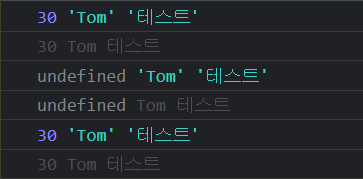
undefined 출력을 방지하기 위해서 default 값을 설정하는 것.
default 값 설정 방법에는 2 가지가 있다.
1. Default Argument : 객체 구조 분해 - 기본값(모르면 여기 클릭)
import React from "react";

function App() {
    return (
        <>
            <Child name={"Tom"}>테스트</Child>
        </>
    );
}

function Child({ age = 30, name, children }) {
    console.log(age, name, children);
}

export default App;
2. default props 지정하기
import React from "react";

function App() {
    return (
        <>
            <Child name={"Tom"}>테스트</Child>
        </>
    );
}

function Child({ age , name, children }) {
    console.log(age, name, children);


    Child.defaultProps = {
    	age = 30
    }
}

// 함수 컴포넌트 밖에 선언해놔도 됨.
// Child.defaultProps = {
//   age = 30
// }

export default App;